Skip to content
ccmods.app

sidebar

v0.1.20

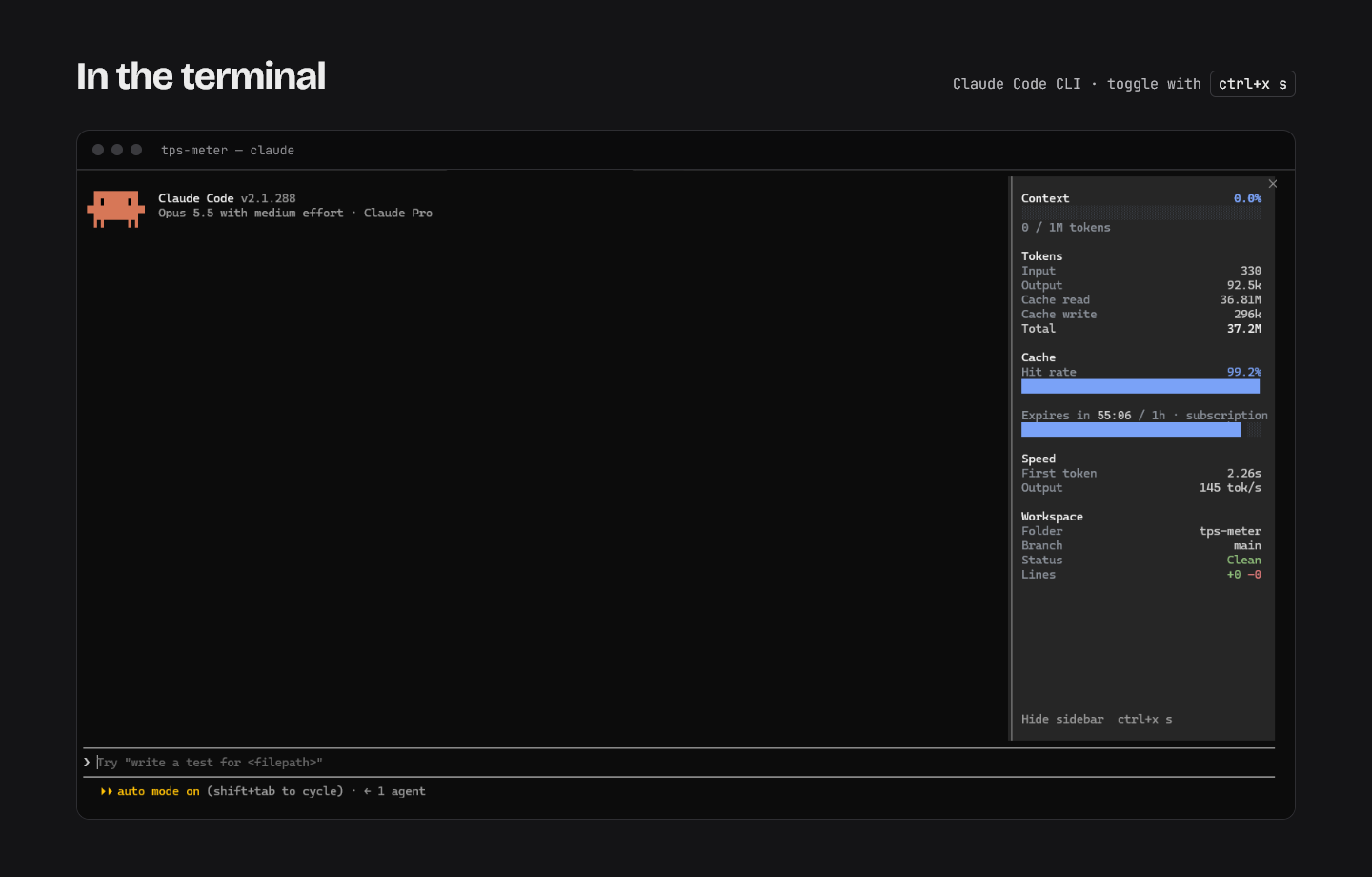
Docks a live stats sidebar beside the session: context use, tokens, cache hit rate and expiry, output speed, tasks and git state.

by @FayequeP3Updated Broad accessGitHub

Installation

  1. Install from your shell (answer y to add the marketplace)

    $ claude plugin install sidebar --marketplace FayequeP/sidebar

Already in a session? Type this at the Claude Code prompt:

$ /plugin install sidebar --marketplace FayequeP/sidebar

Pick a scope and the mod is active right away. Needs Claude Code 2.1.287 or later, in a terminal. Full install guide

sidebar running in Claude Code
Image from the project README

What does sidebar do?

  • Context bar such as 85.4k / 272k, plus input, output and cache read/write tokens including subagents
  • Session spend as 5-hour and weekly limit use on a subscription, or dollars on an API key
  • Cache hit rate and a countdown to the main conversation's prompt cache expiry
  • Time to first token and output tokens per second
  • Task list with progress, git branch and changed lines; /sidebar toggles it, and it shows as a strip above the prompt outside fullscreen

What do you need?

  • Claude Code 2.1.287 or later (terminal)

What can this mod access?

Read from the mod's code with claude plugin validate on Claude Code 2.1.296, synced Oct 12, 2026. This is a capability list, not a security audit. Mods run with your permissions, so install only from authors you trust.

Broad access
  • Runs programs on your machine
  • Can approve tool calls or change settings
  • Intercepts or rewrites tool calls
  • Reads environment variables or settings
Hooks and engine calls (7 + 17)

hooks

  • command.run{command=sidebar}
  • session.start
  • tool.call
  • turn.step
  • ui.close
  • ui.render{component=AbovePrompt}
  • ui.render{component=Pane}

calls

  • $.clock.every
  • $.clock.now
  • $.command.register
  • $.env.get
  • $.env.set
  • $.process.run
  • $.session.cwd
  • $.session.id
  • $.session.usage
  • $.settings.read
  • $.store.get
  • $.store.set
  • $.ui.close
  • $.ui.invalidate
  • $.ui.log
  • $.ui.open
  • $.ui.resolve

How do you uninstall sidebar?

$ claude plugin uninstall sidebar

To switch it off without removing it, use claude plugin disable with the same name.

Do you maintain sidebar?

Add this badge to your README so users can jump to this page for the install command and access report.

Listed on ccmods.app
[![Listed on ccmods.app](https://ccmods.app/badge.svg)](https://ccmods.app/mods/sidebar)

cache-refresher

olddonkey/cache-refresher

3

Shows when the prompt cache expires and what a rebuild would cost, with an opt-in auto-refresh while you are away.

UICommandsWorkflowModerate access
$ claude plugin install cache-refresher --marketplace olddonkey/cache-refresher

prompt-cache-control

Nasrallah-Adel/claude-prompt-cache-control

1

Shows a prompt-cache meter above the prompt with hit rate and a countdown to expiry, and suggests /compact or /clear.

UIPromptCommandsBroad access
$ claude plugin install prompt-cache-control --marketplace Nasrallah-Adel/claude-prompt-cache-control

deadhd

lcalmsky/deadhd

24

Tracks a long task as a live checklist, with session state and last tool shown in a band above the prompt or a status line.

UIPromptToolsBroad access
$ claude plugin install deadhd --marketplace lcalmsky/deadhd