Skip to content
ccmods.app

navigator

Context engineering for Claude Code that keeps long sessions on track so work gets finished instead of derailed.

by @qf-studio356Updated Broad accessGitHub

Installation

  1. Install from your shell (answer y to add the marketplace)

    $ claude plugin install navigator --marketplace qf-studio/navigator

Already in a session? Type this at the Claude Code prompt:

$ /plugin install navigator --marketplace qf-studio/navigator

Pick a scope and the mod is active right away. Needs Claude Code 2.1.287 or later, in a terminal. Full install guide

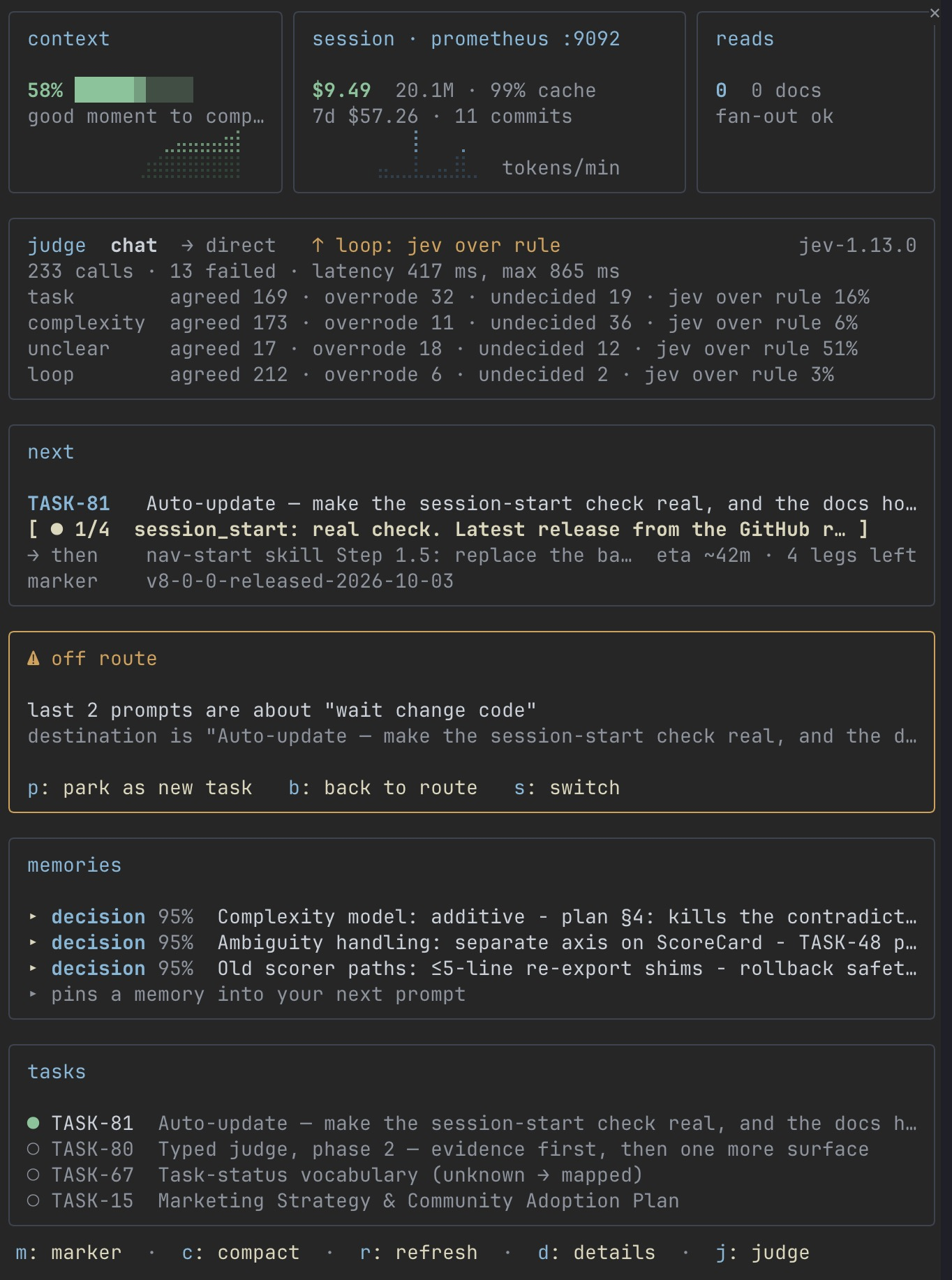
navigator running in Claude Code
Image from the project README

What does navigator do?

  • /nav opens a pane with context fill, session cost, read verdicts, judge decisions, next task leg and memories
  • A one-line band above the prompt shows the phase, context fill and next action
  • Gates task-shaped prompts, guards fan-out reads and logs every refusal as one JSON line
  • Skills triggered by natural language for sessions, loop mode, knowledge graph and reply modes
  • Optional typed prompt judge via TypeSafe, enabled by saying "enable judge"

What do you need?

  • Claude Code 2.1.287 or later (terminal)
  • Optional: TypeSafe API key for the prompt judge

What can this mod access?

Read from the mod's code with claude plugin validate on Claude Code 2.1.296, synced Oct 12, 2026. This is a capability list, not a security audit. Mods run with your permissions, so install only from authors you trust.

Broad access
  • Runs programs on your machine
  • Writes files
  • Makes network requests
  • Can approve tool calls or change settings
  • Submits prompts or messages for you
  • Intercepts or rewrites tool calls
  • Reads or rewrites your prompts
  • Reads files
  • Reads environment variables or settings
Hooks and engine calls (19 + 25)

hooks

  • classic.ConfigChange
  • classic.PostCompact
  • classic.PostToolUseFailure
  • classic.PreCompact
  • classic.SessionStart
  • classic.Setup
  • classic.Stop
  • classic.SubagentStart
  • classic.TaskCompleted
  • classic.TaskCreated
  • command.run{command=nav}
  • prompt.submit
  • session.start
  • tool.call{tool=Bash}
  • tool.call{tool=Edit|Write|NotebookEdit}
  • tool.call{tool=Read}
  • turn.complete
  • ui.render{component=AbovePrompt}
  • ui.render{component=Pane, requestId=nav}

calls

  • $.clock.now
  • $.clock.sleep
  • $.command.register
  • $.env.get
  • $.env.set
  • $.fs.exists
  • $.fs.list
  • $.fs.read
  • $.fs.stat
  • $.fs.write
  • $.http.fetch
  • $.process.run
  • $.prompt.submit
  • $.session.compact
  • $.session.cwd
  • $.session.id
  • $.session.usage
  • $.session.version
  • $.state.get
  • $.state.set
  • $.store.get
  • $.store.set
  • $.ui.open
  • $.ui.resolve
  • $.ui.toast

How do you uninstall navigator?

$ claude plugin uninstall navigator

To switch it off without removing it, use claude plugin disable with the same name.

contextsaver

AlmogBaku/ContextSaver

26

Stops wasteful tool calls in real time so Claude Code spends fewer tokens on work that does not help.

UIPromptToolsBroad access
$ claude plugin install contextsaver --marketplace AlmogBaku/ContextSaver

token-optimizer

alexgreensh/token-optimizer

2.5k

Finds where your context tokens go, trims the waste, and helps sessions survive compaction without losing quality.

UIPromptToolsBroad access
$ claude plugin install token-optimizer --marketplace alexgreensh/token-optimizer

human-in-the-loop

tzafrir/human-in-the-loop

22

Claude assigns you the tasks only you can do; they wait in a pane until you answer, and your answer goes back to Claude.

UIPromptToolsBroad access
$ claude plugin install human-in-the-loop --marketplace tzafrir/human-in-the-loop